> ## Documentation Index
> Fetch the complete documentation index at: https://help.mercury360.com/llms.txt
> Use this file to discover all available pages before exploring further.
# Notification Settings
> Control which events trigger notifications and how you receive them (in-app, email, or push).
Use **Notification Settings** to customize what you get notified about and how you receive alerts. You can reduce noise, ensure critical events reach you quickly, and choose the right channels for different notification types.
## What you can control
In Notification Settings, you can configure:
* Which events trigger notifications
* How you receive them:
* **In-app**
* **Email**
* **Push**
## When to use this
Use this when you need to:
* Reduce unnecessary notifications
* Enable important alerts
* Customize notification channels
* Adjust how you receive updates
## Open Notification Settings
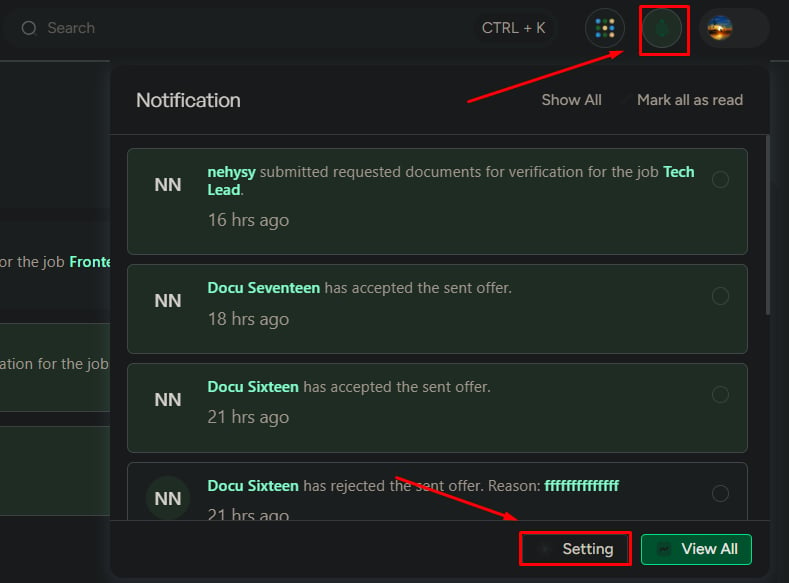
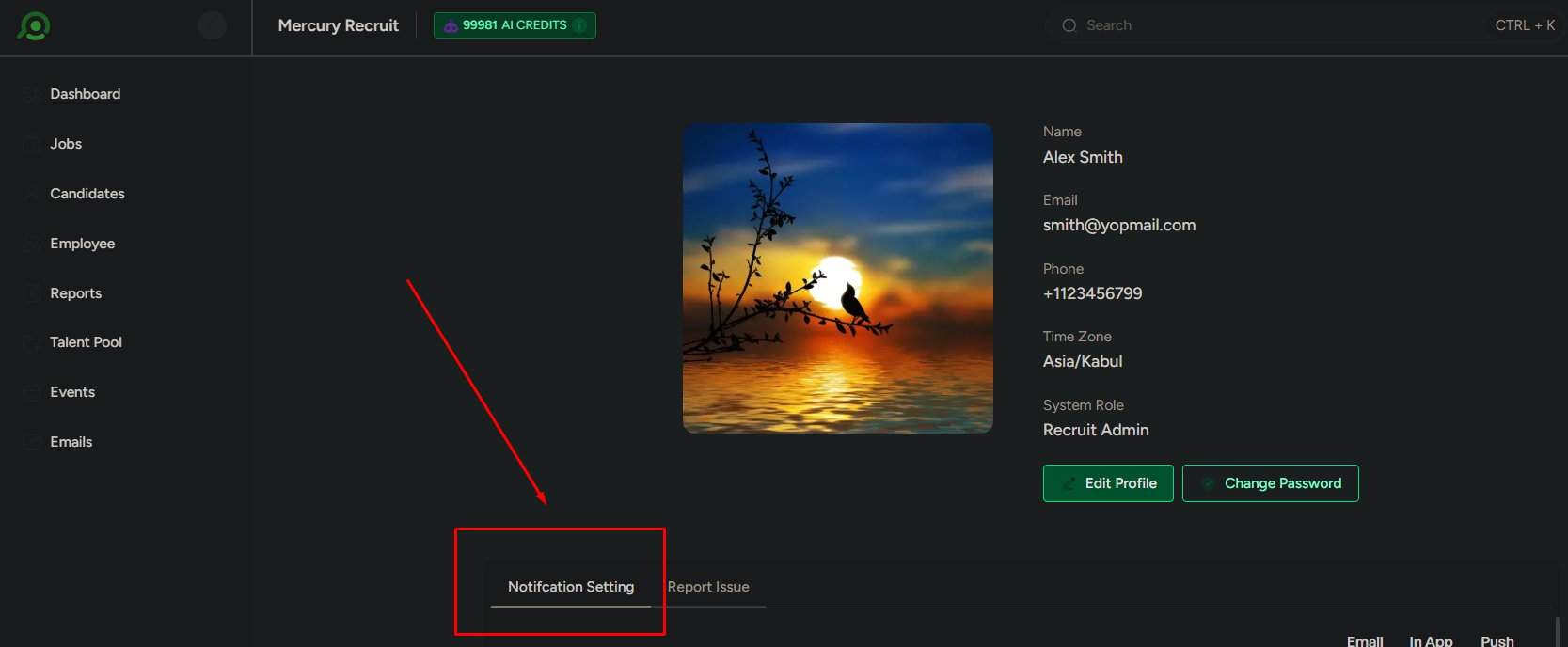
You can access Notification Settings in two ways:
From the notification panel: click **Settings**.
From your profile: scroll to **Notification Settings**.
 ## Notification channels
You can control how notifications are delivered:
* **In-app**
* **Email**
* **Push**
### Default behavior
In-app notifications are enabled for all events by default.
## How settings are structured
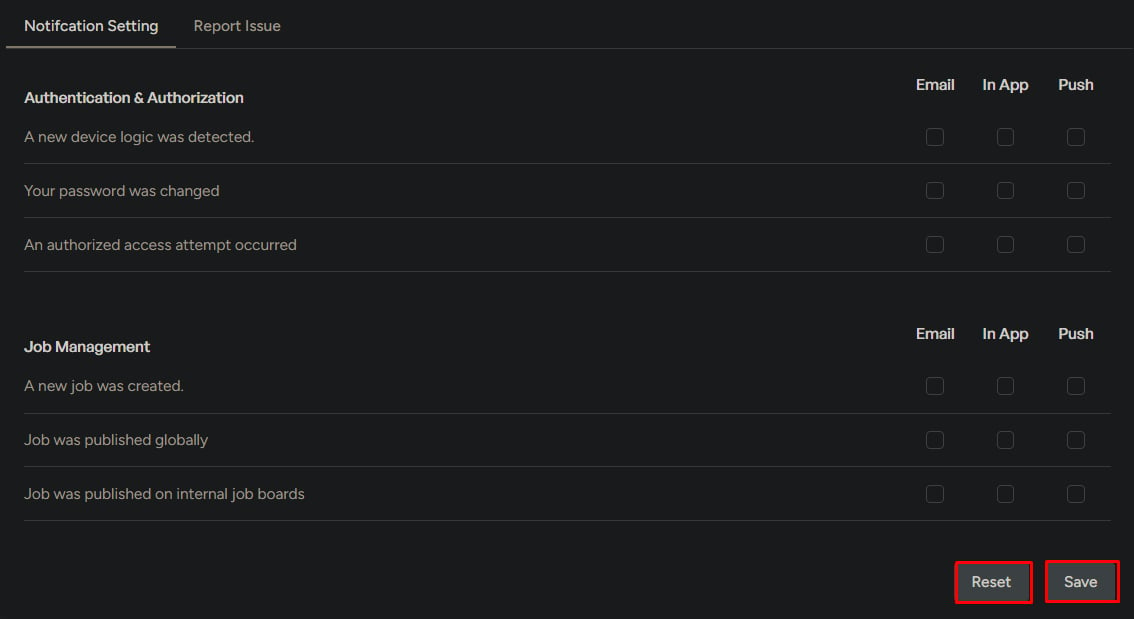
Notifications are grouped by **category**. Each category includes multiple **events**.
For each event, you can enable or disable delivery channels using checkboxes (In-app, Email, Push).
## Notification categories
Below are the common notification categories and example events included in each.
### Authentication and security
* New login detected
* Password changed
* Unauthorized access attempt
### Job management
* Job creation and updates
* Job publishing
* Team member changes
### Followed jobs
* New candidate applications
* Candidate updates in followed jobs
### Candidate management
* Candidate creation and updates
* Stage movement
* Talent pool actions
* Document submissions
### Communication and feedback
* Comments on candidates
* Evaluation requests and submissions
### Assessments
* Assessment sent
* Submission or expiration
* Candidate actions
### Event management
* Event creation and updates
* Accept or decline actions
* Reschedule requests
### Offers
* Offer creation
* Candidate response
* Offer status changes
### Employment management
* Onboarding and offboarding updates
* Process status changes
### Talent pool
* Candidate added to a pool
* Candidate removed from a pool
## Save and reset settings
Click **Save** to apply changes.
Click **Reset** to restore default settings.
## Notification channels
You can control how notifications are delivered:
* **In-app**
* **Email**
* **Push**
### Default behavior
In-app notifications are enabled for all events by default.
## How settings are structured
Notifications are grouped by **category**. Each category includes multiple **events**.
For each event, you can enable or disable delivery channels using checkboxes (In-app, Email, Push).
## Notification categories
Below are the common notification categories and example events included in each.
### Authentication and security
* New login detected
* Password changed
* Unauthorized access attempt
### Job management
* Job creation and updates
* Job publishing
* Team member changes
### Followed jobs
* New candidate applications
* Candidate updates in followed jobs
### Candidate management
* Candidate creation and updates
* Stage movement
* Talent pool actions
* Document submissions
### Communication and feedback
* Comments on candidates
* Evaluation requests and submissions
### Assessments
* Assessment sent
* Submission or expiration
* Candidate actions
### Event management
* Event creation and updates
* Accept or decline actions
* Reschedule requests
### Offers
* Offer creation
* Candidate response
* Offer status changes
### Employment management
* Onboarding and offboarding updates
* Process status changes
### Talent pool
* Candidate added to a pool
* Candidate removed from a pool
## Save and reset settings
Click **Save** to apply changes.
Click **Reset** to restore default settings.
 ## What to be careful about
* Disabling too many notifications can cause missed updates
* Enabling everything can lead to notification overload
* Not using Email or Push for critical events can delay response
Be intentional: keep high-impact notifications enabled, and use Email/Push for time-sensitive events.
## Recommended focus
Prioritize notifications for:
* High-impact events
* Actions that require your attention
* Security-related alerts
* Scheduling changes (events, reschedules, cancellations)
## What to be careful about
* Disabling too many notifications can cause missed updates
* Enabling everything can lead to notification overload
* Not using Email or Push for critical events can delay response
Be intentional: keep high-impact notifications enabled, and use Email/Push for time-sensitive events.
## Recommended focus
Prioritize notifications for:
* High-impact events
* Actions that require your attention
* Security-related alerts
* Scheduling changes (events, reschedules, cancellations)