> ## Documentation Index
> Fetch the complete documentation index at: https://help.mercury360.com/llms.txt
> Use this file to discover all available pages before exploring further.
# Blacklist vs Disqualify Candidates | Choose the Right Restriction
> Understand the difference between disqualified, blacklisted, and inactive candidates — and apply the right restriction without breaking your pipeline.
Disqualifying and blacklisting both restrict candidates, but they operate at very different scopes. Picking the wrong one creates cleanup work for your whole team.
## Choose the right action
Removed from a **single job**. Still available for other roles.
Restricted from **all future hiring** across every job.
Previously blacklisted, now **restored**. Kept for history.
### When to use each
| Status | Use when |
| ---------------- | ------------------------------------------------------------------------------------------- |
| **Disqualified** | The candidate is not suitable for a **specific role**. |
| **Blacklisted** | The candidate should not be considered for **any role** (serious or long-term restriction). |
| **Inactive** | You’re reviewing history; this is **not a decision state**. |
## Disqualify a candidate
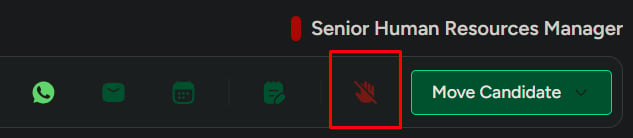
Use this when the candidate shouldn't continue in the **current job**.
Open the candidate from the job's pipeline or the **Candidates** list.
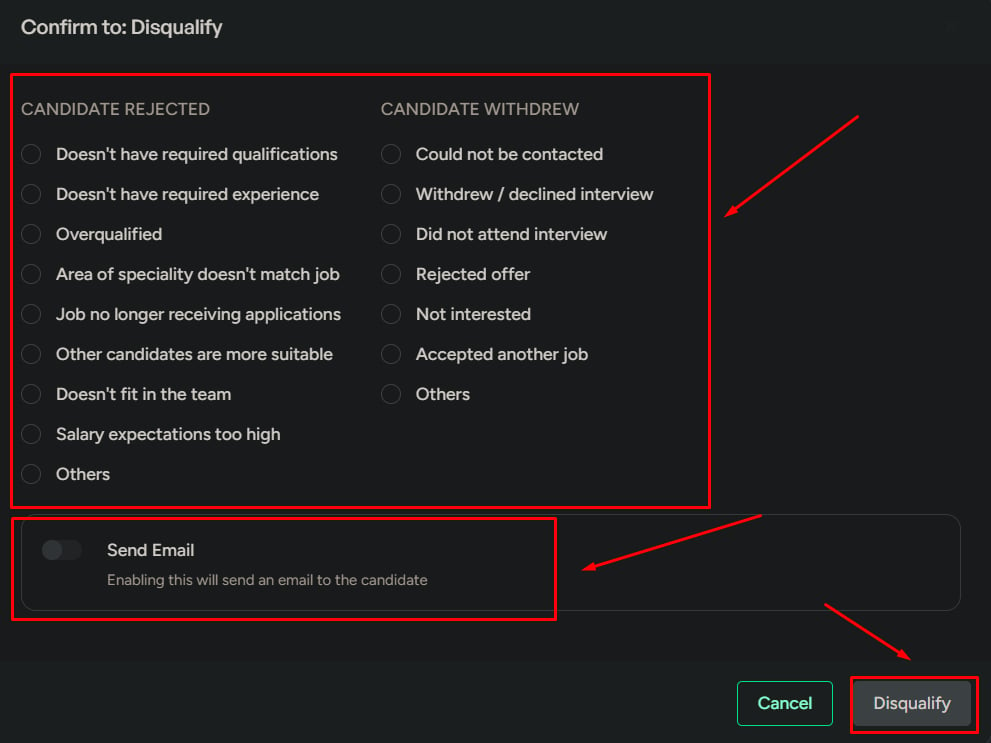
The disqualify dialog opens.
Pick from the predefined reasons configured for your workspace.
Optionally send the candidate a standard rejection email.
The candidate is removed from this job but remains available for other roles.
 ### What happens next
* The candidate is removed from the **current job pipeline**.
* The candidate **remains available** for other jobs.
## Blacklist a candidate
Use this when the candidate shouldn't be considered for **any** role.
Open the candidate from the job's pipeline or the **Candidates** list.
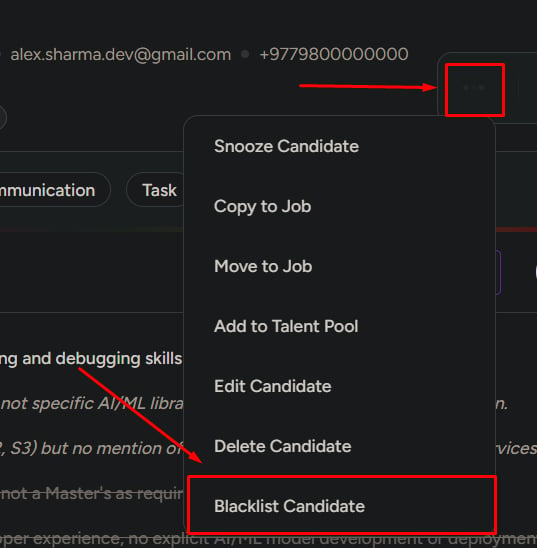
Click **Options** in the action bar.
The blacklist dialog opens.
Pick from your workspace's predefined blacklist reasons.
The expiration date controls how long the restriction applies.
The candidate is added to **Blacklisted Candidates** and automatically disqualified across active jobs.
### What happens next
* The candidate is removed from the **current job pipeline**.
* The candidate **remains available** for other jobs.
## Blacklist a candidate
Use this when the candidate shouldn't be considered for **any** role.
Open the candidate from the job's pipeline or the **Candidates** list.
Click **Options** in the action bar.
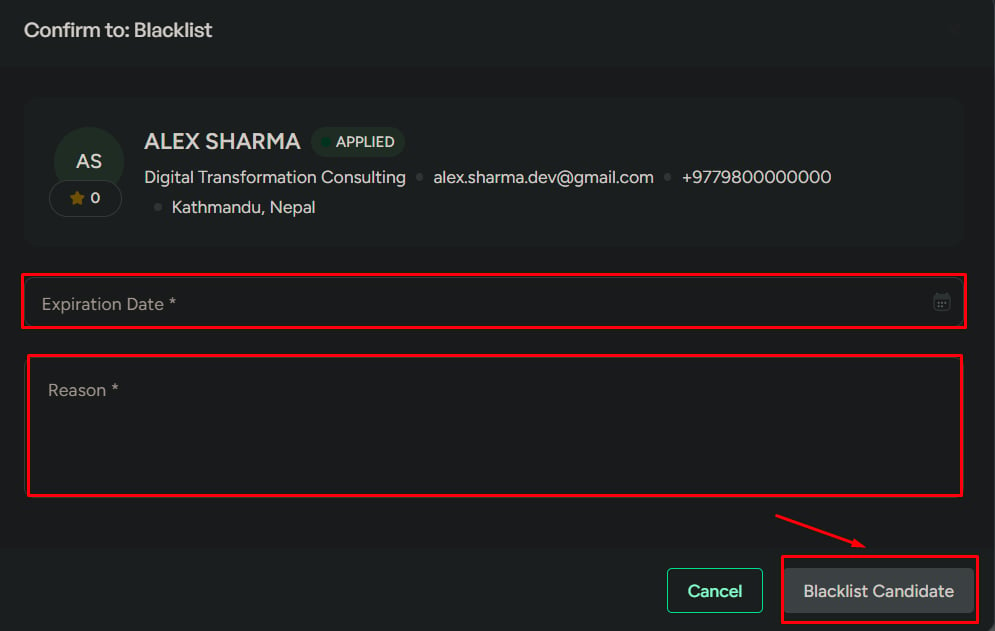
The blacklist dialog opens.
Pick from your workspace's predefined blacklist reasons.
The expiration date controls how long the restriction applies.
The candidate is added to **Blacklisted Candidates** and automatically disqualified across active jobs.
 ### What happens next
* The candidate is added to **Blacklisted Candidates**.
* The candidate is **automatically disqualified** in active jobs.
* The candidate **cannot be considered** while the blacklist is active.
## View blacklisted candidates
Open **Candidates** from the left menu.
Filter the view to only restricted profiles.
Open the candidate profile to review details.
Click **Remove from Blacklist** to lift the restriction.
### What happens next
* The candidate is added to **Blacklisted Candidates**.
* The candidate is **automatically disqualified** in active jobs.
* The candidate **cannot be considered** while the blacklist is active.
## View blacklisted candidates
Open **Candidates** from the left menu.
Filter the view to only restricted profiles.
Open the candidate profile to review details.
Click **Remove from Blacklist** to lift the restriction.

 ### What happens next
* The candidate is **no longer restricted**.
* The candidate becomes **active again**.
* The candidate can be considered for jobs going forward.
* The candidate is **not added back to any job automatically**.
## Important to remember
* **Blacklisting blocks the candidate across all jobs.**
* **Disqualifying removes the candidate from one job only.**
* **Removing from blacklist allows future hiring** but does not restart any prior process.
* **Always confirm before applying restrictions** — reversing them takes manual cleanup.
## Related
Tour the profile and every available action.
Cross-job candidate list, search, and filter.
### What happens next
* The candidate is **no longer restricted**.
* The candidate becomes **active again**.
* The candidate can be considered for jobs going forward.
* The candidate is **not added back to any job automatically**.
## Important to remember
* **Blacklisting blocks the candidate across all jobs.**
* **Disqualifying removes the candidate from one job only.**
* **Removing from blacklist allows future hiring** but does not restart any prior process.
* **Always confirm before applying restrictions** — reversing them takes manual cleanup.
## Related
Tour the profile and every available action.
Cross-job candidate list, search, and filter.