> ## Documentation Index
> Fetch the complete documentation index at: https://help.mercury360.com/llms.txt
> Use this file to discover all available pages before exploring further.
# Add Candidates
> Add candidates manually, import a resume with AI, or upload resumes in bulk—choose the best method for speed, accuracy, and batch size.
There are three ways to add candidates to Mercury Recruit. Pick the right method based on resume quality, batch size, and how much control you need.
Full control over every field. Best for unclear resumes or referrals.
Upload one resume; Mercury auto-fills the fields. Best for most cases.
Upload many resumes at once. Best for large hiring batches.
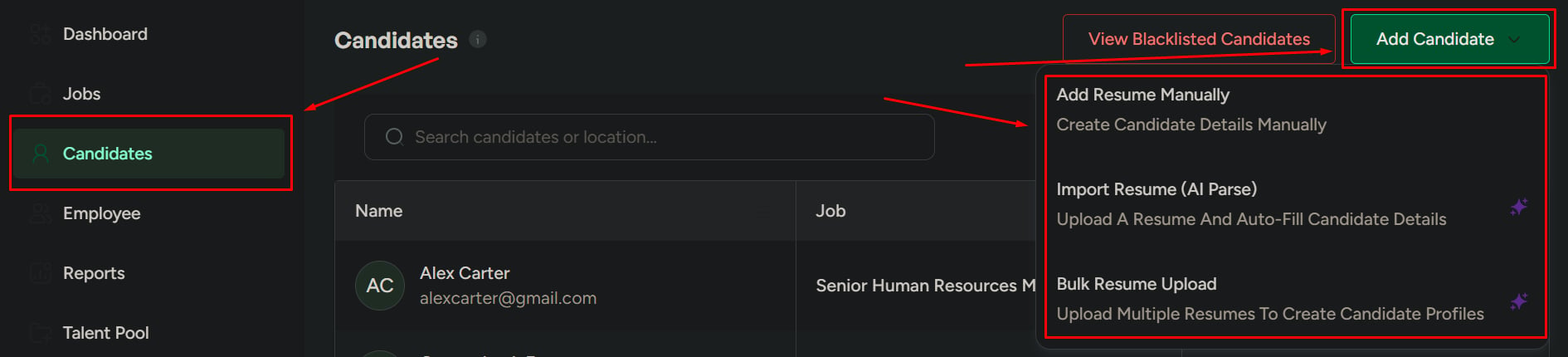 ## Method 1 — Add resume manually
Use this when you need full control over the candidate data.
### When to use it
* The resume is unclear or unstructured
* You need to verify or correct details
* You're adding candidates from interviews, referrals, or notes
From the **Candidates** page or a job’s pipeline.
Use **Assign to Jobs** to attach the candidate to one or more jobs.
Required fields are marked. Optional fields enrich the profile and improve future matching.
| Required | Optional |
| ------------------- | -------------------------------------------------------------------------------------------------------------------------------------------------------------------- |
| Name, Email, Resume | Address, Phone, Cover letter, Work experience, Education, Skills, Projects, Certificates, Languages, Publications, Awards, Summary, Social media, Salary expectation |
Click **Add Candidate** to save the candidate with the data you entered.
## Method 2 — Import with AI (resume parse)
Use this when resumes are clear and you want speed.
### When to use it
* The resume is well-formatted
* You want to save time on data entry
* You're handling multiple individual applications
From the **Candidates** page or a job’s pipeline.
Pick the job from **Assign to Jobs**.
Upload a single resume file and click **Next**. Mercury parses it and auto-fills candidate fields.
Review the parsed fields, correct anything wrong, then click **Add Candidate**.
AI parsing is fast but imperfect on creative or non-standard resume layouts. Always do a quick review before saving.
## Method 3 — Bulk upload
Use this when you need to add many candidates at once.
### When to use it
* Large hiring batches
* Job fairs, agency batches, or bulk submissions
* Speed matters more than per-candidate review
From the **Candidates** page.
All uploaded candidates will be linked to this job.
Drag in multiple files at once.
Click **Upload Candidates**. All candidates are added and linked to the selected job.
## Choose the right method
| Method | Best for | Trade-off |
| ---------------- | -------------------------------------- | --------------------------------- |
| **AI import** | Most applications | Requires a quick review pass |
| **Manual entry** | Referrals, interviews, unclear resumes | Slower but most accurate |
| **Bulk upload** | Large hiring batches | Less time per candidate to verify |
Whichever method you choose, **review candidates after adding** to ensure data accuracy—especially email and phone, which drive every downstream communication.
## Related
Find, filter, and organize candidates across jobs.
Open a profile and take action on a candidate.
## Method 1 — Add resume manually
Use this when you need full control over the candidate data.
### When to use it
* The resume is unclear or unstructured
* You need to verify or correct details
* You're adding candidates from interviews, referrals, or notes
From the **Candidates** page or a job’s pipeline.
Use **Assign to Jobs** to attach the candidate to one or more jobs.
Required fields are marked. Optional fields enrich the profile and improve future matching.
| Required | Optional |
| ------------------- | -------------------------------------------------------------------------------------------------------------------------------------------------------------------- |
| Name, Email, Resume | Address, Phone, Cover letter, Work experience, Education, Skills, Projects, Certificates, Languages, Publications, Awards, Summary, Social media, Salary expectation |
Click **Add Candidate** to save the candidate with the data you entered.
## Method 2 — Import with AI (resume parse)
Use this when resumes are clear and you want speed.
### When to use it
* The resume is well-formatted
* You want to save time on data entry
* You're handling multiple individual applications
From the **Candidates** page or a job’s pipeline.
Pick the job from **Assign to Jobs**.
Upload a single resume file and click **Next**. Mercury parses it and auto-fills candidate fields.
Review the parsed fields, correct anything wrong, then click **Add Candidate**.
AI parsing is fast but imperfect on creative or non-standard resume layouts. Always do a quick review before saving.
## Method 3 — Bulk upload
Use this when you need to add many candidates at once.
### When to use it
* Large hiring batches
* Job fairs, agency batches, or bulk submissions
* Speed matters more than per-candidate review
From the **Candidates** page.
All uploaded candidates will be linked to this job.
Drag in multiple files at once.
Click **Upload Candidates**. All candidates are added and linked to the selected job.
## Choose the right method
| Method | Best for | Trade-off |
| ---------------- | -------------------------------------- | --------------------------------- |
| **AI import** | Most applications | Requires a quick review pass |
| **Manual entry** | Referrals, interviews, unclear resumes | Slower but most accurate |
| **Bulk upload** | Large hiring batches | Less time per candidate to verify |
Whichever method you choose, **review candidates after adding** to ensure data accuracy—especially email and phone, which drive every downstream communication.
## Related
Find, filter, and organize candidates across jobs.
Open a profile and take action on a candidate.